Key takeaways
- Most noises are loose parts. Canopy, mounting, blade, glass and cage screws are the usual sources.
- Check from the ceiling down. Power off at the wall and breaker, then bracket, canopy, downrod, housing, blades and light.
- A hum can be the wrong control. Breezary manuals say to use only the controller supplied with the fan.
- Stop for grinding or burning. Don’t open the motor; contact support with a video and the model number.
Why Is My Ceiling Fan Clicking, Ticking or Humming?
In most cases a part has worked loose or is touching something it shouldn’t: the canopy against the ceiling, a blade screw, light glass, a cage screw or wire connectors in the canopy. A steady hum can also come from a wall control the fan wasn’t designed for.
Breezary’s installation manuals list the same suspects. The troubleshooting table in the Walren 60 Inch Black Walnut Ceiling Fan Without Light manual, repeated in several other models, says to make sure the motor housing screws are snug, the blade bracket screws are tight, wire connections aren’t rattling, glassware and bulbs are secure, the canopy doesn’t touch the ceiling, and rubber isolator pads sit between the mounting plate and the outlet box.
This guide is about sounds. If the fan visibly sways, start with how to balance a wobbling ceiling fan. If you are comparing fans before buying, quiet ratings are explained in how to read quiet ceiling fan decibel ratings.
Check first: switch the fan off at the wall and at the breaker, and wait for the blades to stop completely before touching any part. Never reach into a running fan or cage.
Match the Noise to the Likely Cause
Note what the sound is, when it happens and whether it follows the fan’s speed. That usually points to one area of the fan.
| What you hear | When | Likely cause | Check |
|---|---|---|---|
| Random tick or click, often weeks after installation | Any speed; comes and goes | Canopy, trim or mounting screws working loose | Bracket, canopy screws, canopy gap |
| A click once per turn that speeds up with the fan | Follows fan speed | Blade screw, blade bracket or something in the blade path | Blade and bracket screws; anything near the blades |
| Rattle at one or two speeds | Certain speeds only | Light glass, bulbs, shade or cage parts vibrating | Glass, bulbs, shade and cage fasteners |
| Buzz or hum | Steady while running | Loose accessories resonating, or a wall control not supplied with the fan | Fasteners; the type of wall control |
| Whoosh or rush of air | Rises smoothly with speed | Air moving through the blades or cage | Usually normal |
| Scraping, grinding or a burning smell | Any time | Something rubbing or failing | Stop using the fan; contact support |
Why Can a Quiet Ceiling Fan Start Clicking or Ticking After Weeks or Months of Use?
A running fan vibrates slightly all the time, and over weeks that can loosen a screw or let a part settle. Noise in the first day is a different case: Breezary manuals say most noises associated with a new fan disappear during a 24-hour break-in period.
When a ticking sound shows up later, start where the vibration meets the ceiling and work down. With the power off:
- Mounting. Lower the canopy and check that the bracket is tight to a secure, fan-rated box. For a repetitive ticking noise, the Vastora 72-Inch Black 8-Blade Ceiling Fan with Light & Remote manual says to check for obstructions in the rotor path and that the mounting hardware at the ceiling is firmly fastened.
- Canopy and trim. The canopy should sit a short distance from the ceiling without touching it, and its screws should be snug.
- Wire connectors. Connections folded into the box shouldn’t rattle against each other or the box wall. If anything looks loose, scorched or damaged, stop and call a licensed electrician.
- Downrod. Check the cross pin and set screws. Breezary manuals say the downrod and its set screws must be completely tightened.
- Motor housing and blades. Tighten the motor housing screws and the screws holding each blade bracket to the motor hub.
- Light kit. Tighten the glass or shade and make sure the bulbs are seated.
After each step, run the fan at the speed where you heard the noise, so you know which fix worked.
Why Is My Ceiling Fan Humming?
A hum usually means something is vibrating against something else, or the fan is getting power through a control it wasn’t made for. Check both before suspecting the motor.
The Vastora 72-Inch manual lists three checks for a humming noise: make sure the controller you use is the one supplied with your fan; make sure all accessories are securely fastened, because loose parts often cause a vibrating or buzzing sound; and, if a resonant vibration remains, take the fan down and reinstall it.
On DC fans a wall dimmer or speed control is a common culprit, and Breezary manuals warn against solid-state speed controls altogether. What a DC ceiling fan is and which controls work explains why.
Listen at different speeds. A hum that appears at only one speed often points to a loose part or the ceiling resonating; a hum at every speed with a dimmer or speed knob in the circuit points to the control. A DC fan may also make a brief whir and a small back-and-forth movement as it starts; DC ceiling fan troubleshooting covers what is normal at startup.
Can the Cage Make a Ceiling Fan Sound Different?
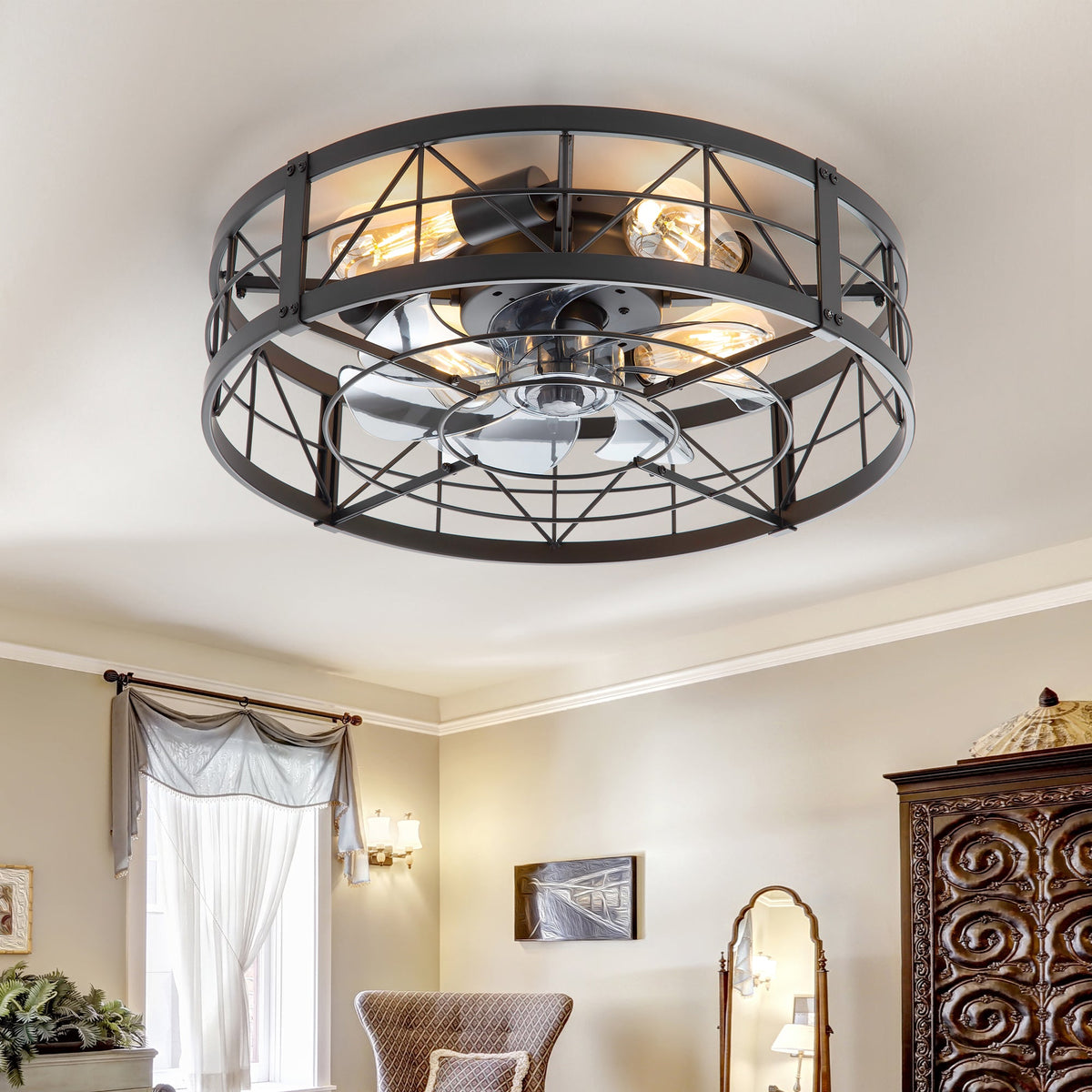
Yes. A cage or enclosure adds metal bars, joints, screws and a light assembly that can all vibrate, and air passing through the grille adds its own sound at higher speeds.
The Brielle 20" Flush Mount Caged Ceiling Fan With Light & Remote puts seven ABS blades and four E26 bulb sockets inside a round matte-black cage of intersecting metal bars. The Jorelle 52-Inch Farmhouse Caged Ceiling Fan With Light & Remote keeps its five blades outside and wraps a black metal cage around two E26 bulbs. The Halcyra 20-Inch Boho Rattan Ceiling Fan With Light hides three blades inside a woven rattan-style cage. Each has more fastened joints than an open fan.
Why does a caged fan develop ticking, humming or resonance?
- A cage screw or clip loosens, and the cage buzzes at one speed.
- A bulb or shade touches the cage and ticks as it vibrates.
- A bulb is too large for the space; Brielle’s page reminds you to check the room inside the cage before choosing a bulb.
- A blade touches the inside of an enclosure after cleaning or a knock.
Is it air noise or a mechanical noise?
A steady rush that rises and falls smoothly with speed is air moving through the blades and grille, and it fades at lower speeds. A tick, rattle or hum that stays when you turn the speed down is mechanical and worth tracking down.

Does the Metal Cage Need Periodic Screw and Fastener Checks?
Yes. Check the cage, shade and blade fasteners whenever you clean the fan and any time a new sound appears. The Breezary manuals we reviewed don’t give a fixed interval, so tie it to your cleaning routine.
With the power off, work around the cage: the screws or clips joining it to the housing, any joints between cage sections, the shade or glass, and the bulbs. Snug them without forcing; overtightening can crack glass or strip threads.
Cleaning is the natural time to do this, and how to clean enclosed and caged ceiling fans shows how to reach hidden blades without forcing the cage. Never bend a blade bracket back into shape: Breezary manuals warn against bending blade brackets during installation, balancing or cleaning.
When Should You Stop Using a Noisy Ceiling Fan?
Turn the fan off and leave it off if you hear scraping or grinding, smell burning, see the canopy or bracket move, or find a blade touching anything. Those are not settling noises.
- Scraping, grinding or squealing that follows the fan speed.
- A burning or hot-plastic smell, or any sparking.
- The canopy or mounting bracket moving against the ceiling.
- A blade striking the cage, a shade or the ceiling.
- A new noise after the fan was hit, dropped or taken apart.
Don’t open the motor. The Vastora manual states that the unit contains no user-serviceable parts and that repairs should go to authorized personnel. Contact Breezary support at 707-249-3725 or support@breezary.com with the model number, a short video with sound, and the speeds at which the noise happens. The motor carries a limited lifetime warranty and fan parts a one-year limited warranty, for the original purchaser of products bought from Breezary.com or an authorized retailer and installed in the US.
Shopping for a caged fan with light?
View Caged Ceiling FansCeiling Fan Noise FAQ
Why does my new ceiling fan click?
Some sounds settle in the first day; Breezary manuals describe a 24-hour break-in period during which most new-fan noises disappear. If a click remains, check the blade screws, motor housing screws, light glass and canopy with the power off.
Why did my ceiling fan start ticking after a few weeks?
Vibration can loosen screws and let parts settle over time. Check the mounting bracket, canopy, downrod set screws and blade brackets, in that order, with the power off at the wall and breaker.
Is it normal for a ceiling fan to hum?
A faint, even rush of air is normal. A distinct hum usually comes from loose parts resonating or from a wall control the fan was not supplied with, especially a dimmer or speed control on a DC fan.
Why does my caged ceiling fan rattle?
Cages have more screws, clips and light parts than open fans. A loose cage fastener, shade or bulb touching the cage is the usual cause. Tighten them with the power off and make sure the bulbs fit the space inside the cage.
Can I oil a noisy ceiling fan motor?
Don’t open or oil the motor. None of the Breezary manuals we reviewed tells owners to lubricate it, and the Vastora manual states the unit has no user-serviceable parts. Contact support instead.