
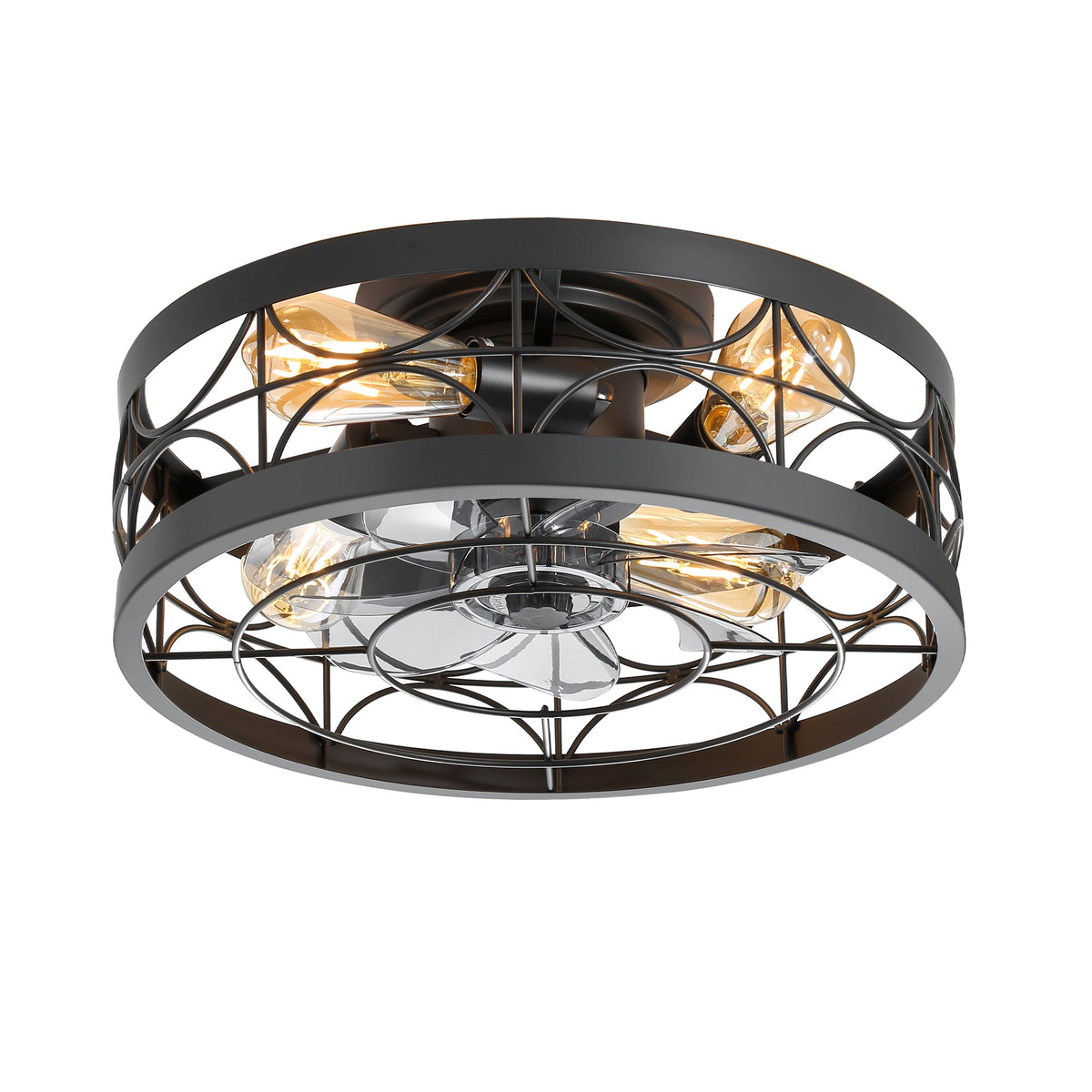
Key takeaways
- Power off and let bulbs cool. Use the remote and the wall switch, and the breaker if you will touch sockets.
- Clean through the openings. A flexible microfiber duster reaches hidden blades without taking the fixture apart.
- Don't assume the cage comes off. Check the manual, the product page or customer service for your model first.
- Match the method to the material. Damp wipes for ABS and metal, a drier touch for MDF, plywood and woven shades.
How Do You Clean an Enclosed Ceiling Fan Without Taking It Apart?
Turn off the power, dust the outside of the cage, then reach the blades through the openings with a long, flexible duster or a barely damp microfiber cloth. For routine cleaning, nothing needs to come off.
- Power off. Turn the fan and light off with the remote, then switch off the wall switch. If you will touch sockets or wiring areas, turn off the breaker.
- Let the light cool. Exposed bulbs, like the four E26 bulbs ringing the Ravora 16.5-Inch Small Caged Ceiling Fan With Light & Remote, get warm. Give them a few minutes.
- Set up safely. Use a stable step ladder and lay a sheet over the bed or table below to catch dust.
- Dust the outside first. Wipe the cage bars, rings and top rim with a dry microfiber cloth so loose dust doesn't fall into the blades.
- Reach the blades. Slide a flexible microfiber duster or a soft bottle brush through the openings and wipe the top face of each blade. Turn the blade set slowly by hand to bring the next blade into reach.
- Lift sticky film. If dust has turned greasy, use a cloth that is barely damp with water and a drop of mild dish soap, then follow with a dry cloth.
- Dry and test. Wait until everything is dry, restore power and run the fan on low for a minute.
Where Does Dust Build Up on a Caged Fan?
Mostly on the top face of the blades, on the inside of the cage, and around the bulbs and sockets. Those are the spots the air passes first, and the hardest to see from the floor.
In forward mode an enclosed fan pulls air in through the top and sides of the frame, which is why the upper surfaces get dirty first. Our explainer on how enclosed ceiling fans work shows that airflow path in a diagram. Different designs trap dust in different places:
- Bars and rings: the geometric cage on the Brielle 20" Flush Mount Caged Ceiling Fan With Light & Remote has many joints where dust settles.
- Crystals: the crystal accents on the Calivra 28-Inch Crystal Chandelier Ceiling Fan With Light show dust and fingerprints quickly.
- Weaves: the rattan-style weave on the Halcyra 20-Inch Boho Rattan Ceiling Fan With Light holds dust in its texture.
- Exposed bulbs and sockets: the five E26 sockets on the Glenis 28" Small Caged Ceiling Fan With Light & Remote and the four on the Ravora.
Open-Bar vs Fine-Mesh Cages: Which Is Easier to Keep Clean?
Open bars are easier. Wide gaps let a flexible duster reach the blades and let you see what you missed, while a fine mesh or a dense pattern catches dust across its whole surface and keeps tools away from the blades inside. None of the caged fans in our catalog uses a fine-mesh cage, but the frames still range from open to dense:
- Open metal cages, like the Tavon 28-Inch Black Caged Ceiling Fan With Lights and the Brielle's geometric bars: the quickest to dust, with most blades reachable through the gaps.
- Crystal strands on the Calivra Crystal Chandelier and Solvane: every crystal is another surface to wipe, and they leave less room for a duster.
- Woven cages, like the Halcyra Boho: dust settles into the texture, so brush it out rather than wiping.
- Solid shades in acrylic, like the Marora's: the outside wipes clean in one pass, but the blades are reachable only through the openings.
A dusty metal frame usually comes clean with a dry cloth. If a cage finish looks dull, spotted or worn, follow how to clean a ceiling fan without damaging the finish rather than reaching for a stronger cleaner.
Can You Remove the Cage or Grille to Clean the Blades?
Sometimes, but it depends on the model, and many cages are part of the fixture's structure. Check your model's manual before you loosen anything, and if the manual doesn't show the cage coming off, clean it in place.
Our product descriptions don't describe removing the cage on any of these models, so we won't promise it is possible. Here is how to find out for your fan:
- Read the manual. Look for a parts diagram and any maintenance or cleaning section. If the cage, shade or crystal holders appear as separate parts with screws, the manual should show how they come off and go back on.
- Check the product page. Some listings include manual details. The Marora 20-Inch Black Ceiling Fan With Light listing, for example, notes separate manuals for its flush (40018) and downrod (40019) versions, so make sure you follow the one that matches your fan.
- Ask customer service. Call 707-249-3725 or email support@breezary.com with the product name and model, and ask which parts are meant to be removed for cleaning.
Check first: if a part is riveted or welded, holds wiring or a light socket, or has no screws you can see, treat it as fixed. Never force a cage, and never take anything apart with the power on.
How Do You Clean the Blades, Shade and Light Separately?
Match the method to the material. Hard plastic blades and metal cages take a damp wipe, wood-based blades and woven shades need a drier touch, and lights should only be cleaned cool and with the power off.

Blades
- ABS blades (Ravora, Brielle, Glenis, Solvane): a dry or barely damp microfiber cloth.
- MDF or plywood blades (the Tavon 28-Inch Black Caged Ceiling Fan With Lights uses MDF): dust dry, and keep moisture to a lightly damp cloth so the material doesn't swell.
- Don't press hard or bend a blade. Ravora and Brielle list a 12° blade pitch, and a bent blade can cause wobble.
Cages and shades
- Metal cages: dry microfiber, or a damp cloth with mild soap for grease. Skip abrasive pads, which can scratch matte or plated finishes.
- Acrylic or PMMA shades (Marora, Halcyra Boho): a soft cloth with water and mild soap. Avoid solvents and rough cloths, which can haze plastic.
- Crystal: wipe each piece with a microfiber cloth. Only take crystals off if the manual shows how, and dry them fully before rehanging.
- Rattan-style weave: a soft brush or the brush attachment of a vacuum on low. Not sure whether a weave is natural or synthetic? Our guide to rattan, wicker and bamboo fan materials explains how to tell.
Bulbs and LEDs
- Replaceable bulbs: once cool, wipe them with a dry cloth. Never wipe a bulb or socket with a wet cloth.
- Integrated LEDs (Halcyra and Marora models): wipe only the outside of the cover. If you need to open a light cover, follow our steps for replacing a ceiling fan light bulb or LED module, which covers cover removal.
How Often Should You Clean a Caged Ceiling Fan?
There is no fixed schedule in our product listings. A quick dusting every few weeks while the fan is in regular use, and a fuller clean a few times a year, keeps most homes ahead of the buildup.
Clean more often if you notice any of these:
- Gray lines on the blade edges, or dust drifting down when the fan starts.
- The fan is in a kitchen. Glenis lists kitchens among its rooms, and cooking grease turns dust sticky faster.
- The light looks dimmer or the crystals look cloudy.
- Someone in the home is sensitive to dust.
Before winter, when you switch the motor to reverse, is also a good time for a full clean.
What Mistakes Can Damage an Enclosed Fan?
Most damage comes from liquid in the motor area, force on the cage or blades, and parts put back loose. Keep cleaning dry or lightly damp and gentle, and don't take apart what the manual doesn't show.
- Spraying cleaner directly at the fan. Spray the cloth instead, and keep liquid away from the motor housing and sockets.
- Soaking blades or shades, especially wood-based blades.
- Pulling on the cage or leaning on the fixture for balance while on the ladder.
- Bending cage bars to reach a blade. Use a thinner, flexible duster.
- Putting crystals or shades back in a different order or with loose screws.
- Cleaning with the power on, or with the remote within reach of someone else.
If the fan wobbles or clicks after cleaning, turn it off and check that every screw you touched is snug. If it still wobbles, see how to balance a wobbling ceiling fan. For problems that remain, contact customer service. Breezary's warranty covers the motor with a limited lifetime warranty and fan parts and light kits with a one-year limited warranty for the original purchaser.
Shopping for a caged or enclosed fan you can live with?
View Enclosed Ceiling FansCleaning Enclosed Fans FAQ
Can I take the cage off my enclosed ceiling fan to clean it?
Only if your model's manual shows how. Many cages are part of the fixture's structure. Check the manual's parts diagram, the product page, or ask customer service at 707-249-3725 or support@breezary.com. If removal isn't shown, clean the blades through the openings.
What is the best tool for cleaning hidden fan blades?
A long, flexible microfiber duster or a soft bottle brush that fits through the cage openings. Turn the blade set slowly by hand, with the power off, to reach each blade.
Can I use spray cleaner on a caged ceiling fan?
Spray the cloth, not the fan. Keep liquid away from the motor housing, sockets and integrated LEDs, and use only a barely damp cloth with mild soap for greasy dust.
How do I clean the crystals on a fandelier?
With the power off and the bulbs cool, wipe each crystal with a soft microfiber cloth. Only remove crystals if the manual shows how, and let them dry fully before rehanging them in the same positions.
Why is my fan wobbling after I cleaned it?
A blade may have been bent or nudged, or a screw may have loosened. Turn the fan off, check every screw you touched and look for a bent blade. If it still wobbles, follow a balancing routine or contact customer service.
Can the hidden blades inside an enclosed ceiling fan be removed or replaced?
On some models, yes, per the manual, which shows the order in which the grille, shade and blade set come off. Not every enclosed fan is built to be taken apart, so if your manual doesn't show the blades coming off, clean them in place. Replace a damaged blade only with a part made for your exact model, available through customer service at 707-249-3725 or support@breezary.com, then run the fan on low and check for wobble, as in our guide to balancing a wobbling ceiling fan.


